













Visualize Dynamics 365 Relationships as Interactive Mind Maps
Dynamics 365 CRM Relationship Mapping across Mind Map, Tree View & Hierarchy Control
What's Map My Relationships?
Map My Relationships is a Dynamics 365 relationship mapping and CRM data visualization app that helps users visualize connections between Accounts, Contacts, Opportunities, and custom entities in a single interactive view. Using Mind Map, Tree View, and Hierarchy Control layouts, teams can explore account hierarchies, identify key stakeholders, and uncover important business relationships.
Users can create connections, trigger activities, and run workflows directly from the map, making it easier to navigate CRM data, gain insights, and take action without leaving Dynamics 365.
Recent Updates
New in 2026: Visualize Dynamics 365 CRM Data and Relationships More Clearly
Use the Mind Map View to see how records, stakeholders, and accounts are connected.
View Account and Contact hierarchies in a clear, structured Hierarchy Control View.
Navigate account, project, and case hierarchies using a collapsible Tree View.
Customize relationship maps with color-coded paths, custom labels, and filtered views.
Information Vault
Benefits of using Map My Relationships
Manage emails, tasks, calls, and relationships from a single visual workspace, reducing time spent switching between CRM records.
Visualize CRM relationships in real time to identify key stakeholders, influence paths, and account connections before every interaction.
Replace repetitive record searches and disconnected navigation with an interactive Dynamics 365 relationship map.
Visual relationship mapping helps sales teams understand organizational structures faster, prioritize opportunities, and close deals.
Supported On
Dynamics 365 CRM
Online | Dataverse
Features
Here’s How Map My Relationships Helps You Visualize and Manage CRM Relationships
Mind Map View in Dynamics 365
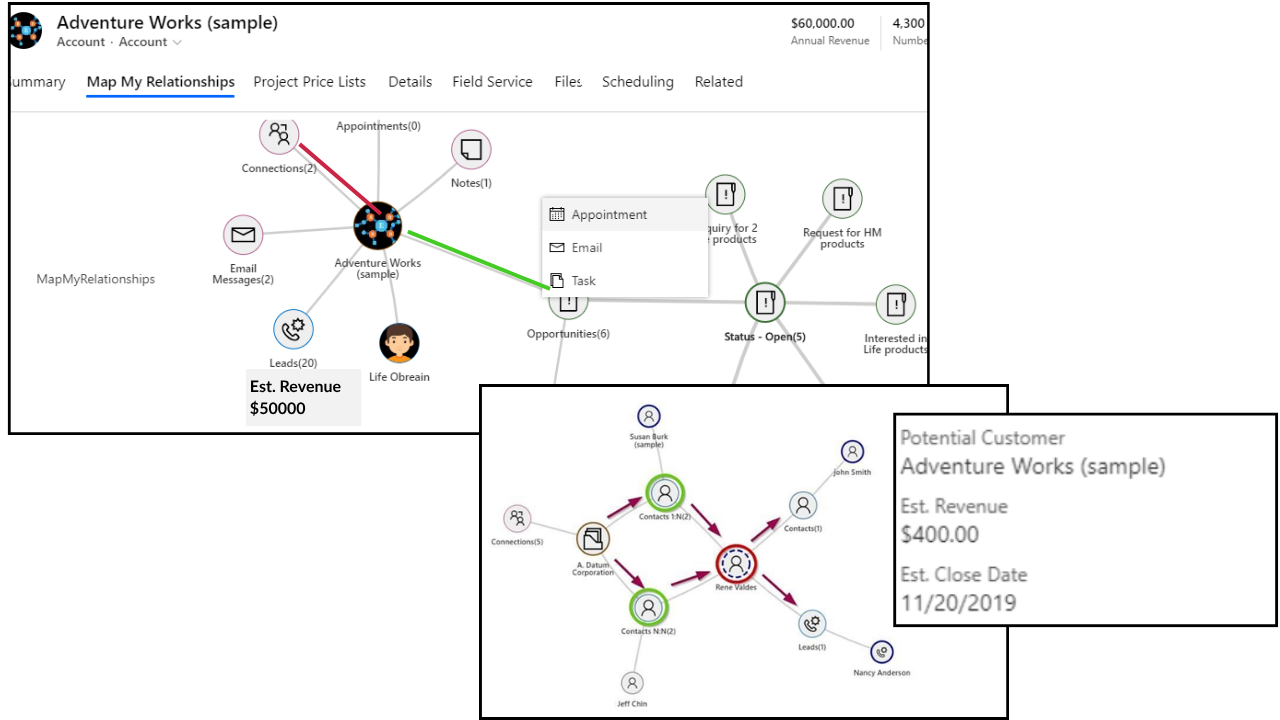
Map My Relationships brings a 360° Mind Map View to Dynamics 365 CRM, transforming complex CRM data into an interactive relationship mapping experience. Visualize Accounts, Contacts, Opportunities, and custom entities from a single workspace, exploring stakeholders, influence paths, and connected records in real time, without switching screens.
- 360° Relationship Explorer: Navigate unlimited relationship levels across Accounts, Contacts, Opportunities, and custom entities in a single Dynamics 365 CRM view.
- Take Action Directly from the Map: Create activities, associate records, and trigger workflows from any relationship node without switching screens.
- Color-Coded Relationship Mapping: Instantly identify relationship types, stakeholder roles, and influence paths using visual legends and color-coded connections.
- Spider View and Full-Screen Mapping: Group complex connections in a spider view or expand into a full-screen Dynamics 365 relationship map for easier navigation.
Hierarchy Control in Dynamics 365
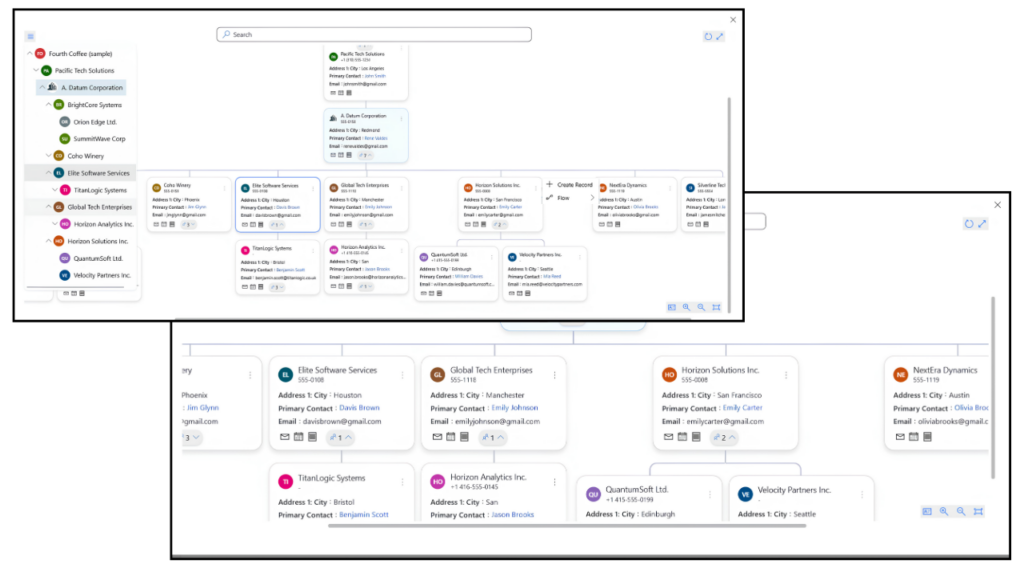
Map My Relationships provides an interactive Hierarchy Control View in Dynamics 365 CRM that displays self-referential parent-child relationships, Account-to-Account and Contact-to-Contact, in a structured visual hierarchy. Acting as a live org chart, it stays continuously synchronized with CRM data, helping teams understand organizational structures and relationship paths without manual record navigation or screen switching.
- Visual Org Chart for Dynamics 365 CRM: View complete account hierarchies in a top-down visual format without navigating between records.
- Instant Child Record Creation: Create and automatically link child records directly within the hierarchy view.
- Take Action from the Hierarchy Panel: Trigger tasks, emails, activities, and on-demand workflows directly from the Dynamics 365 CRM hierarchy control panel.
- Unlimited Hierarchy Navigation: Drill up or down across multiple hierarchy levels with a single click to explore complex CRM relationship structures.
Tree View Visualization in Dynamics 365
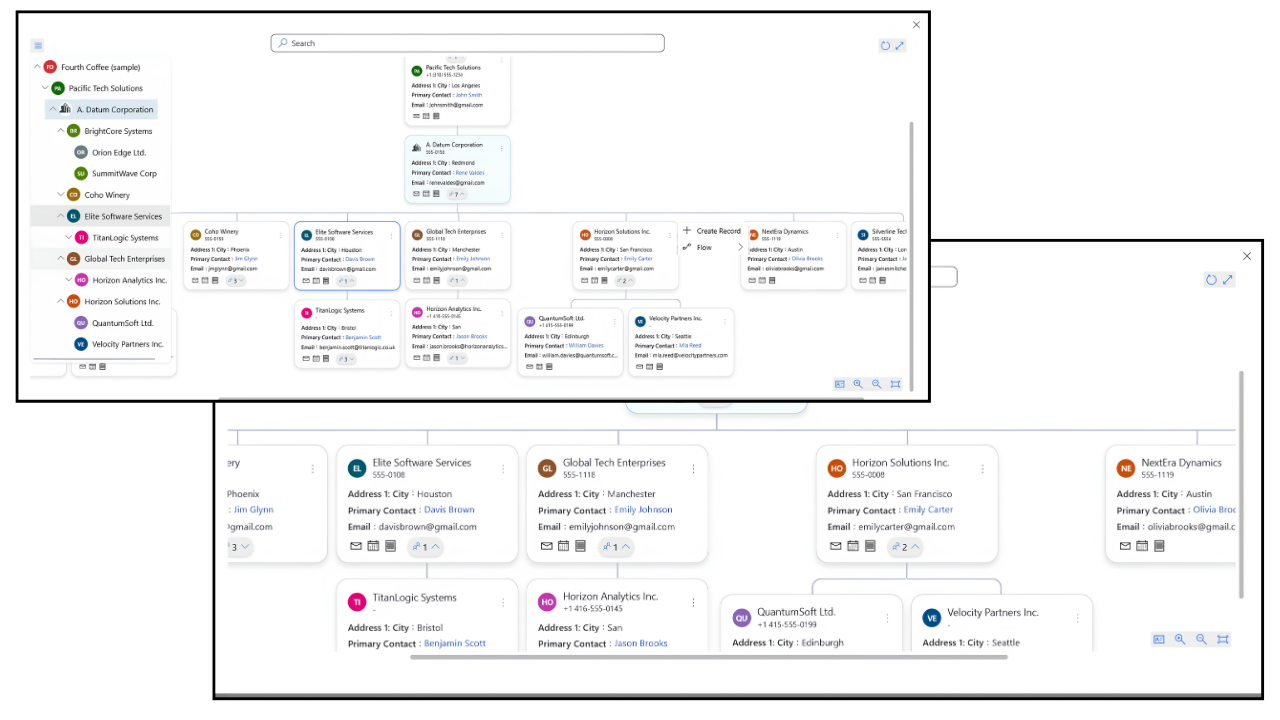
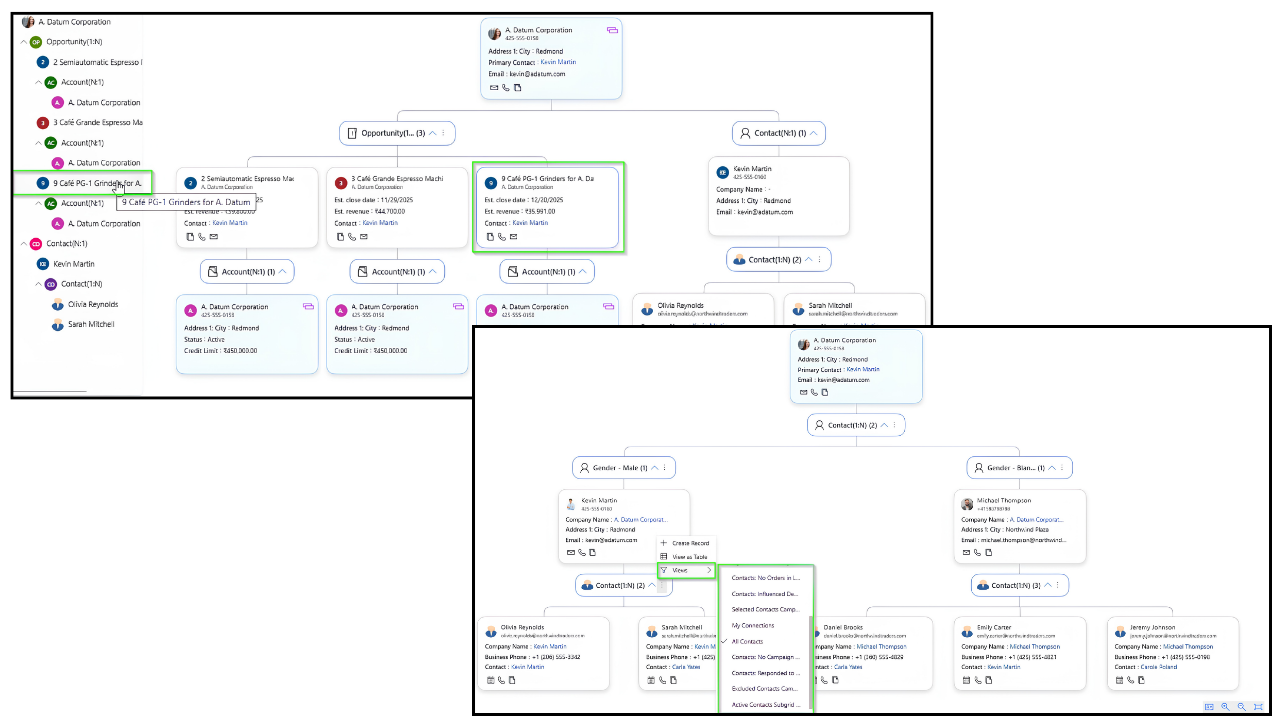
Tree View delivers structured relationship mapping in Dynamics 365 CRM through an interactive top-to-bottom layout with a synchronized navigation panel, displaying complete parent-child hierarchies at every level. Teams can navigate complex account hierarchies, project structures, and case escalations, while exploring relationship structures, grouping records, applying filters, and taking action without switching screens.
- Structured Top-to-Bottom Relationship Mapping: Visualize complete account hierarchies and parent-child relationships in Dynamics 365 CRM using a clean, easy-to-navigate tree layout.
- Interactive Tree Navigation Panel: Use a collapsible side panel mirroring the full hierarchy for faster, context-aware navigation.
- Grouping and Aggregated Data Insights: Analyze grouped CRM records and aggregated values directly within the Dynamics 365 relationship visualization view.
- Take Action Without Leaving the View: Create records, apply filters, and manage relationships directly from the Tree View interface.
More Features
Effortless Data Filtering
Analyze CRM records using aggregated values, custom node layouts, and personalized filters
Export Relationship Maps
Download relationship maps as images to easily share insights across teams
Auto-Expand Nodes
Automatically expand hierarchy levels for easier navigation of complex relationships.
Hover for Record Details
Preview key record information without opening additional records or screens.
Create Associated Records
Create and associate new records directly from the relationship map.
Link Related Records
Connect related records across multiple relationship levels from a single view
Spider View
Group multiple relationships around a central record for a clearer view of complex connections.
Full-Screen View
Expand Mind Map and Hierarchy views for a more focused relationship mapping experience.
Interactive Tree Navigation
Browse parent-child hierarchies with a synchronized navigation panel.
Map Your Way to Success: A Guide to Using Mind Maps to Unlock the Power of Dynamics 365 CRM Connections
testimonials
What Our Customers Are Saying?
Our Blogs
How to Configure CRM Relationships for a Mind-Map View in Dynamics 365
In this blog, we’ll walk through how to configure CRM records and relationships to visualize them in a Mind Map View within Dynamics 365 CRM.
Dynamics 365 CRM Hierarchy Control: 5 Benefits Every CRM Admin Should Know
In the world of CRM, data visibility, navigation, and relationship mapping are critical for smooth operations. Yet many Dynamics 365 CRM…
Relationship Mapping and Data Visualization in Dynamics 365 CRM: A Complete Guide
In modern B2B selling, revenue rarely depends on one contact. It depends on networks, influencers, decision-makers, sponsors, blockers, subsidiaries…
Frequently Asked Questions
Dynamics 365 CRM relationship mapping helps organizations visualize how Accounts, Contacts, Opportunities, Cases, and other records connect across the CRM. It provides an interactive relationship view that helps teams identify stakeholders, account hierarchies, influence paths, and connected business relationships from a single workspace.
Map My Relationships transforms disconnected Dynamics 365 CRM records into interactive mind maps, hierarchy views, and relationship charts directly inside Dynamics 365 CRM. It helps users explore relationships across standard and custom entities, navigate complex account structures, and take actions such as creating activities or linking records from a single visual workspace.
Map My Relationships transforms Dynamics 365 CRM records into interactive mind maps directly inside Dynamics 365 CRM. Accounts, Contacts, Opportunities, and custom entities can all be visualized in a spider-style relationship layout that displays connected records level by level from a central node.
Users can drill into relationship nodes to expand additional connections, explore stakeholders, create activities such as emails and calls, and edit records directly from the mind map view without switching screens. Every interaction stays synchronized with Dynamics 365 CRM in real time, ensuring the relationship map always reflects live CRM data instead of a static visualization.
Map My Relationships helps users visualize Dynamics 365 CRM account hierarchies through interactive Tree View and Hierarchy Control layouts. Teams can explore parent-child account structures, account structures and organizational hierarchies from a single visual workspace without navigating multiple CRM records or screens.
With multi-level drill-down, color-coded relationship paths, and real-time CRM synchronization, users can easily understand complex account structures and stakeholder relationships directly inside Dynamics 365 CRM.
Map My Relationships allows users to visualize relationships across both standard and custom entities in Dynamics 365 CRM through interactive Mind Map, Tree View, and Hierarchy layouts. Users can explore connected records, parent-child relationships, and cross-entity connections directly from a single visual workspace inside Dynamics 365 CRM.
Administrators can configure which custom entities and relationship types appear in the relationship map, making it easier to understand complex business processes and connected CRM data without navigating multiple forms or subgrids.
Yes. Map My Relationships allows users to create activities such as tasks, emails, and phone calls directly from the Dynamics 365 CRM relationship map without switching screens. Users can also create and associate related records within Mind Map, Tree View, and Hierarchy layouts, with new records automatically linked to the correct parent relationship.
This helps teams manage CRM relationships, activities, and connected records faster from a single interactive workspace.
Map My Relationships is a relationship mapping and visualization tool built specifically for Dynamics 365 CRM. It creates interactive relationship charts directly from live CRM data using Mind Map, Tree View, and Hierarchy layouts, without requiring external diagramming software.
Users can also create records, log activities, send emails, and manage relationships directly from the visual relationship map, helping teams reduce CRM navigation time and work more efficiently.
Yes. Administrators can configure custom entities and relationships to appear in the map, allowing teams to visualize business-specific data alongside standard Dynamics 365 records.
Relationship mapping helps teams understand customer connections, identify key stakeholders, navigate account hierarchies, and reduce time spent searching through records. It provides a clearer view of CRM data and helps users take action faster.
Gain visibility into customer relationships and accelerate your sales pipeline with the right connections!
